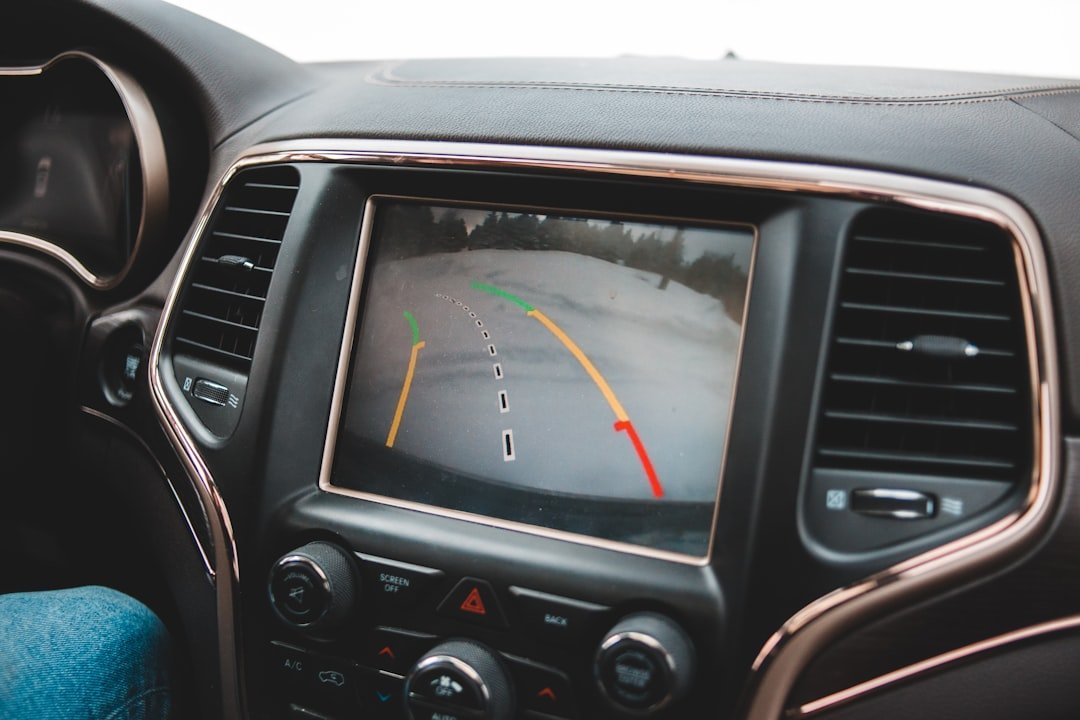
Clean the camera lens, then test the view in a clear parking spot before relying on it. If you are asking, how does a backup camera work, it uses a small rear-facing camera that turns on when reverse is selected and sends a live image to a dashboard screen or mirror display. The image is only an aid. How does a backup camera work in daily use? It gives you a view low behind the vehicle, where the rear window and mirrors have blind spots, but you still need to look around the vehicle and use mirrors before moving.
How does a backup camera work in a vehicle?
Most factory systems receive a reverse signal from the transmission range switch, body control module, or infotainment system. Reverse engages. That signal supplies power to the camera and tells the display to interrupt whatever it was showing, whether that is audio information, navigation, or a phone screen, with the camera feed.
The camera uses a wide-angle lens to capture a broad area behind the bumper. Its wiring sends video to the screen, usually through a dedicated video cable in older or aftermarket setups and sometimes through a digital vehicle network in newer factory systems. The display shows the image almost immediately. There is usually a slight delay, so do not use the picture to judge fast-moving traffic.
Wide-angle lenses are useful because they show more of the area near the bumper. They also distort distance. Objects near the outer edges of the screen can look farther away, narrower, or oddly shaped, while a low object directly behind the vehicle may appear larger than expected. Learn your own screen. A few careful tests with a cone or empty box can show where the image ends and where the actual rear bumper sits.
Many systems overlay colored parking lines. Fixed lines stay in the same place as you turn the wheel, while dynamic lines move to estimate the vehicle’s path based on steering-angle data. The lines are guides, not measurements. Their accuracy depends on correct camera mounting, wheel alignment, steering-angle calibration, tire size, and whether the vehicle is on level ground.
Some vehicles combine the camera with rear parking sensors, cross-traffic alerts, or automatic braking. These are separate systems. Sensors commonly use ultrasonic transducers in the bumper, while cross-traffic monitoring often uses radar modules behind the rear bumper corners. A camera can show an obstacle that sensors miss, and sensors may warn about something the camera view does not make obvious.
Backup camera types and what changes
The right setup depends mainly on the screen already in the vehicle, the type of rear bodywork, and how permanent you want the installation to be. Simple systems can work well. Factory-style integration usually takes more parts and more vehicle-specific knowledge.
| Type | How it connects | Best fit | Watch for |
|---|---|---|---|
| Factory camera | Built into the vehicle’s original display system | Vehicles equipped from new | Replacement parts may need programming or calibration |
| License-plate camera | Camera mounts at or near the plate, then connects to a screen | Most cars, trucks, and SUVs | Mount angle and plate-light clearance matter |
| Surface-mount camera | Small camera screws or adheres to a hatch, tailgate, or bumper area | Pickups, vans, trailers, unusual rear panels | Exposed wiring and weather sealing need care |
| Replacement-handle camera | Camera replaces a hatch or tailgate handle assembly | Vehicles with available model-specific parts | Fitment must match the exact model year and trim |
| Wireless camera kit | Camera transmits video to a receiver or monitor | Trailers or installs where running video cable is difficult | Wireless interference, delay, and claimed range vary |
| Mirror monitor or separate screen | Aftermarket display replaces a mirror or mounts on the dash | Older vehicles without a usable factory screen | Dash placement must not block forward visibility |
A wired camera is usually the straightforward choice for a permanent vehicle install because the video path is consistent once it is routed and protected properly. It still needs power. Many aftermarket cameras draw power from the reverse-light circuit, which makes them wake up only when reverse is selected.
Wireless kits often still require a power wire at the rear camera and power at the front monitor or receiver. They are not truly wire-free. They simply avoid running one long video cable through the cabin, and signal quality can change with vehicle length, metal body panels, nearby electronics, or a trailer between transmitter and receiver.
Installation basics before you buy parts
First, identify the display you plan to use. Check the owner documentation, a vehicle-specific wiring guide, or the head unit maker’s instructions to find out whether the original screen accepts a camera input and whether it needs an interface module. Do this first. Plug shapes alone do not confirm compatibility.
For an aftermarket screen, you generally need a camera, a display or compatible head unit, power wiring, a video connection, and mounting hardware. Some kits include nearly everything. Others require adapters, especially for factory radios or vehicles with digital camera signals.
Choose the mounting location before drilling any holes. A camera near the license plate often gives a centered view of a car or SUV bumper, while a pickup may work better with a tailgate handle camera or a camera mounted high enough to see the bed edge and hitch. Keep it centered. A crooked camera makes guide lines misleading and can make backing into a space unnecessarily difficult.
Use a protected wiring route. On a hatch or liftgate, the factory rubber boot between the body and moving panel is usually the sensible place to route a wire, provided there is room and the wire cannot chafe against hinges or sharp metal. Leave enough slack. A wire pulled tight may eventually break when the hatch opens repeatedly.
At the rear, installers often tap the positive reverse-light wire for camera power and use a clean chassis ground. Confirm wire identity with a wiring diagram and a multimeter rather than relying on color alone, because wire colors and connector locations differ by year, trim, and market. Disconnect power when appropriate. Modern vehicles can store fault codes or react badly to careless probing around modules, airbags, and data wiring.
Route video wiring away from high-current power cables where practical, and protect it with loom, tape, or grommets where it passes through metal. Water finds gaps. Any hole through exterior sheet metal needs a proper grommet and sealant suitable for automotive use, or corrosion and leaks can follow.
Before reassembling trim, test the system with the engine on, the parking brake set, and a helper watching the area around the vehicle. Check that reverse brings up the image, the view is not upside down, and the camera does not cut out when the hatch moves. Verify it twice. Then adjust the camera angle so you can see a small strip of bumper plus the ground behind it.
Using the image safely
Start with a walk-around when children, pets, shopping carts, tools, or low posts may be behind the vehicle. Cameras have blind zones. Dirt, rain, snow, sun glare, a dark garage, and a loaded cargo area can all make the image harder to trust.
Back slowly enough that you can stop well before an object reaches the bumper. Look at the screen briefly, then scan mirrors and surroundings. Keep your head moving. The camera is especially helpful for centering in a parking bay, lining up a trailer hitch, and seeing low obstacles close behind the vehicle, but it cannot see through another parked vehicle or around a corner.
If the image is blurry, clean the lens with water and a soft microfiber cloth. Avoid abrasive cleaners. If it is black, flickers, or appears only sometimes, inspect the camera lens, connectors, hatch wiring, fuse, and reverse-light operation before replacing parts; a shop can diagnose vehicle-specific wiring and module faults without guesswork.
Frequently asked questions
Does a backup camera record video?
Usually, no. A standard reversing camera sends a live image only while the vehicle is in reverse. Dash cameras, security camera systems, and some surround-view systems may record, but that depends on the hardware and settings. Check the manual.
Why does the camera image look farther away?
The wide-angle lens changes perspective. It can make open space look larger and objects look more distant than they really are, especially near the sides of the image. Use the view as a reference. Practice with a safe marker behind the vehicle before judging close distances by screen alone.
Can I add a backup camera to an older car?
Yes, in many cases. A standalone mirror monitor or dash-mounted display avoids compatibility questions with an old factory radio, while an aftermarket head unit can provide a larger integrated screen. Wiring is the main job. Verify local rules on screen placement and plate-area modifications before fitting anything.
Why does my camera stop working in rain or after a car wash?
Moisture in a connector, a damaged seal, or water entering the camera housing are common causes. Dry the visible connections and inspect the cable route for pinches or loose grommets. Do not ignore recurring faults. A shop can check connectors and voltage at the camera without replacing good parts.
Are parking guide lines accurate?
They can be useful when the camera is mounted correctly and the vehicle is on flat ground. Dynamic lines generally follow steering input better than fixed lines, but neither accounts perfectly for curbs, slopes, trailer angles, or an off-center camera. Treat them as estimates. Your mirrors and a final visual check still matter.
Related posts
This article is for general informational purposes only and is not mechanical, legal, financial, or insurance advice. Prices, insurance rates, tax credits, and manufacturer-stated fuel economy or EV range are estimates that change over time and vary by vehicle, region, and provider — always verify current figures with a dealer, mechanic, insurer, or official source before making a decision.
Disclosure: This post may contain affiliate links. If you click through and make a purchase, we may earn a commission at no extra cost to you. We only recommend products we’ve researched or genuinely believe in.